Posts

Read File using Relative Path

  file_name = "..//..//data//data//test.txt" This code will move 2 back folder then look for data//data/text.txt file. This way you can navigate to relative folder while reading any file in python.

Create and read QR code

QR codes are machine readable 2 dimensional pixelated barcodes which can be used to store some information.  QR = quick response Let see some of usecase.  1. online payments 2.  check hotel menu, 3. wifi password sharing  People carry their mobile all the time, it's part of life now. QR provide option to scan a code and get information in your mobile. Is it cool.  Steps to generate QR code.  Install qrcode package using below command.  pip install qrcode Code to create QR code.  import qrcode qr_code = qrcode.make('Hi, I am from Code Adhyayana team.'  ) qr_code.save('intro_qr.png') Additional properties of qrcode module. 1. Version : there are 40 version available, starting from smallest 1 to largest 40. 2. error_correction : ERROR_CORRECT_L, M, Q, H 3. box_size 4. border 5. add data 6. make 7 . make image qr_object = qrcode.QRCode(     version=2,     error_correction=qrcode.constants.ERROR_CORRECT_L,     box_siz...
Git Command

1. git clone -b branchName url Copy url from git clone option from repository.  2. git status  To check if git there is any new file or not and basic git status.  3. git branch  To get details about git branches. If star ⭐ is in front then it's currently points to that branch.  4. git branch branchName  Create a new branch.  5. git checkout branchName Points to branch name specified.  6. git add .  All the files from local to staging.  7. git add fileName Add a particular file. 8. git commit -m "first commit" Commit all files in staging so that it will be ready for migration. 9. git config --get remote.origin.url Just to verify if code is pointing to right repository.  10. git push -u origin branchName Move code to git repository. 11. Create a pull request to merge code from branchName to master branch. Error 1. Some of the files are not moving to staging area in git add .  Files were in state modified/ Untracked  Structur...

Virtual Environment for Python

Image
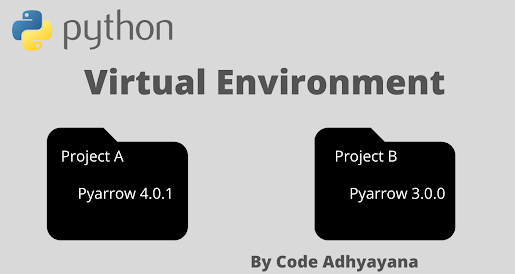
How to Create Virtual Environment for Python Development? First we need to understand that why do we need virtual environment. It helps us to create isolated environment for python development.  Let's try to understand problem without virtual environment. You are working on two different project say Project A and Project B. Now Project A need pyarrow version 4.0.1 and Project B need 3.0.0 as dependency. If you have only one environment for development then you can keep one of them. Now using virtual environment we can have multiple environment let's say env 1 for project A and env 2 for project B, this way both of them will have their requirement version of package.  Steps to create a virtual environment in Windows Machine. Step 1. Install virtualevn using below command              >  Pip install virtualenv  Step 2. Create a virtual environment "myenvA"            > virtualenv myen...

How to Install Python in Windows 10?

Image
 How to Install Python in Windows 10? We all should learn programming. These day no matter if you are going to book a flight ticket or order pizza, we are using internet for sure. Lot of things has been changed in past few years. No need to be in log queue for hours. Few years back I stand on the queue for hours to make reservation in railways, now it's matter of few clicks.  Programming world is like a magic world for people who don't know it. It helps us to think in a logically. Let's begin the journey of programming world with python. You may ask " Why Python? " because python is easiest programming language with powerful capabilities. Most interesting part is that you will write your code like you are instructing some other person.  First we are going to install python 3 in our windows 10 machine.  Step 1. Open  https://www.python.org/   which is python's official website. Step 2. Click on Downloads Step 3. You will get a link to download python la...